
SheetSync for WooCommerce — Sync Your WooCommerce Store with Google Sheets
Managing a WooCommerce store often requires logging into the dashboard again and again to check orders, update stock, change product prices, or track order status.
What if you could manage your WooCommerce store directly from Google Sheets?
That’s exactly what SheetSync for WooCommerce does.
SheetSync is a powerful WooCommerce to Google Sheets integration plugin that automatically syncs your store data with Google Sheets. It allows store owners to view, manage, and update WooCommerce data directly from a spreadsheet.
This makes store management faster, easier, and more efficient.
SheetSync for WooCommerce — FREE Version
The free version of SheetSync is available on WordPress.org and is perfect for small WooCommerce stores that want to start syncing product data with Google Sheets.
Key Features
WooCommerce Products → Google Sheets Sync
Easily sync your WooCommerce products to Google Sheets and view product data in a clean spreadsheet format.
Column Mapping
Choose exactly which columns you want to sync, including:
- SKU
- Product Title
- Price
- Stock
- Status
This gives you full control over how your data appears in Google Sheets.
One-Click Manual Sync
With just one click, you can manually sync all your WooCommerce products to Google Sheets.
Sync Logs
Track every sync activity with detailed logs so you always know when data was updated.
Works on Any Hosting
SheetSync works on any hosting environment.
There is no Composer setup and no special server configuration required.
1 Active Connection
The free version allows one active connection between WooCommerce and Google Sheets.
Perfect for small stores that want a simple WooCommerce Google Sheets sync solution.
SheetSync PRO — Full WooCommerce Google Sheets Integration
If you want to manage orders, products, and store activity in real time, then SheetSync PRO unlocks powerful automation features.
It transforms Google Sheets into a complete WooCommerce management dashboard.
Full Store Order Overview in Google Sheets
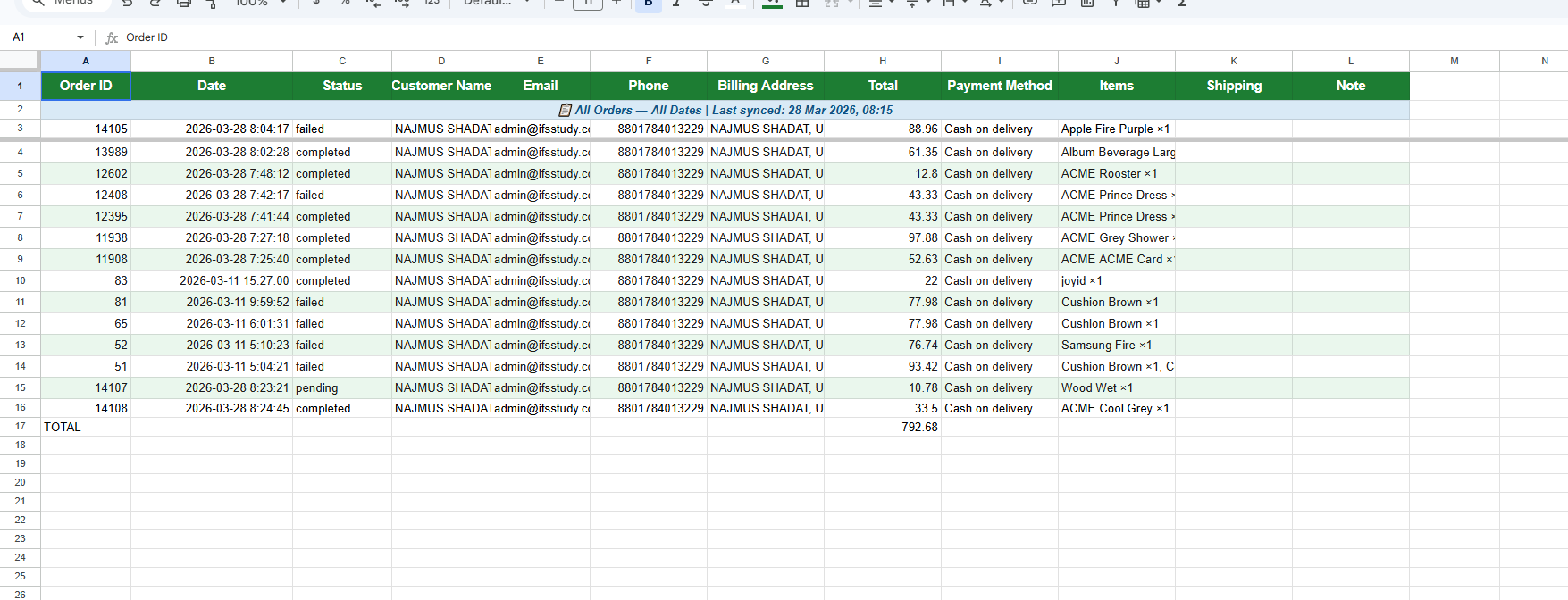
With SheetSync PRO, your WooCommerce orders are automatically organized into separate sheets based on order status.
Your spreadsheet will include tabs like:
- Processing — orders currently being processed
- On-Hold — pending or hold orders
- Completed — successfully completed orders
- Cancelled — cancelled orders
- Refunded — refunded orders
- All Orders — complete order list in one place
This makes it incredibly easy to track store activity at a glance.
Complete Order Details in Sheets
Each order row includes full customer and order information such as:
- Order ID
- Order Date
- Status
- Customer Name
- Phone
- Address
- Order Total
- Payment Method
- Items
- Shipping
- Order Notes
Everything is visible in a structured spreadsheet format.
Live TOTAL Calculation
Every sheet includes a live TOTAL row at the bottom.
Example:
Processing Orders → TOTAL: $1,250
Completed Orders → TOTAL: $8,720
On-Hold Orders → TOTAL: $410
When new orders arrive, totals update automatically.
If an order is cancelled, the row is removed and the total adjusts instantly.
Automatic Order Status Movement
When an order status changes in WooCommerce, the row automatically moves to the correct sheet.
Example:
Processing → Completed
The row is removed from the Processing sheet and automatically added to the Completed sheet.
Both totals update instantly without manual work.
Edit WooCommerce Data Directly from Google Sheets
SheetSync PRO is not just for viewing data — it allows two-way editing.
You can:
- Change order status directly from the sheet
- Update product price from the sheet
- Update product stock from the sheet
All changes automatically sync back to WooCommerce.
Team Collaboration Without WooCommerce Access
Instead of giving your team full WooCommerce dashboard access, simply share the Google Sheet.
Your team can:
- View orders
- Update product prices
- Update stock
- Track sales
All without logging into WooCommerce.
Real-Time WooCommerce Sync
SheetSync PRO uses webhook-based real-time syncing.
That means:
- New orders appear instantly in Google Sheets
- No cron jobs
- No waiting 10–15 minutes for updates
Your data stays fully up to date.
100% Secure Data Sync
Security is a priority.
SheetSync uses:
- AES-256 encryption for Google credentials
- Direct communication between WooCommerce and Google
- No third-party servers storing your data
Your store data always remains private and secure.
Why Store Owners Love SheetSync
SheetSync saves time and simplifies store management by letting you control WooCommerce directly from Google Sheets.
Instead of jumping between dashboards, everything becomes organized, fast, and collaborative.
Whether you’re tracking orders, updating products, or monitoring sales, SheetSync gives you a smarter workflow.